Why we built it
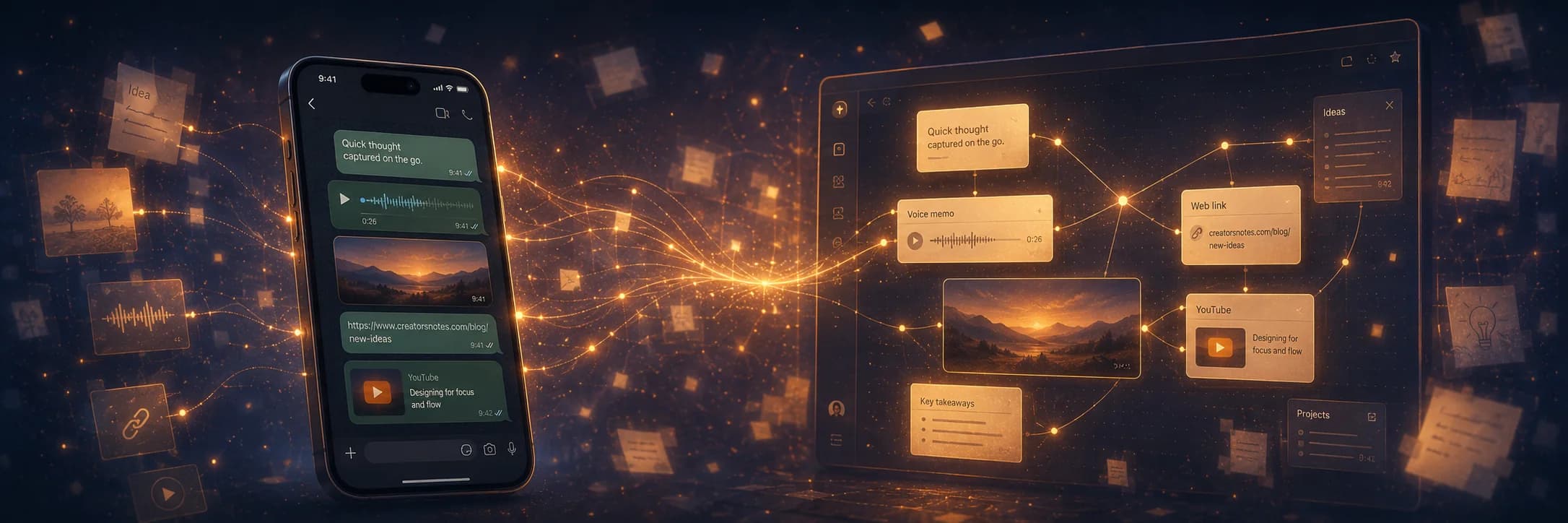
The most useful product thoughts almost never strike at a desk with CreatorNotes open. They strike walking home from a customer call, mid-shower, in the back of an Uber, scrolling the phone before bed, half-watching a YouTube tutorial on the couch.
In those moments, opening a dedicated note app is too much friction. So most people don't. They promise themselves they'll remember (they won't). Or they fire off a half-formed message in a WhatsApp chat with themselves, where it gets buried under everything else. Or they just forget.
One missed thought is fine. The cost is the slow leak of every idea that didn't make it home, and with it the trust that CreatorNotes is the place where everything lives.
WhatsApp is already open on everyone's phone. If we make it a way into CreatorNotes, the easiest app on the device becomes the front door for your second brain. Nothing new to learn. Hold the voice button. Share a link from Safari. Paste a tweet.
What's in v1
Connect once
Open Settings → Integrations → WhatsApp, tap Connect WhatsApp, and send a one-shot BIND <code> from your phone. About 30 seconds, no SMS round-trip, no extra app. From that moment on, every message you send to our number becomes a note.
Text becomes a note
Whatever you type lands as a fresh note. The first non-empty line is the title. The rest is the body. Linebreaks are preserved so dashed lists and short paragraphs render the way you typed them.
Photos arrive embedded
Snap a whiteboard, a competitor's packaging, a screenshot. Send the photo. It's uploaded to your workspace and embedded inline at the top of the new note. If you wrote a caption, the caption becomes the title.
Links get clipped, not just stored
Send any URL. Substack, Medium, a tweet, a docs page. We fetch the page server-side, strip the chrome and ads, and save the clean article markdown as the note. The article's own title becomes the note title, and the original URL stays at the top so the source is one click away.
Voice memos with structure
Hold the WhatsApp voice button and speak. We transcribe the audio with Whisper and run an AI pass that pulls out a clean headline, key points, and next steps from what you said. All three render as h2 sections at the top of the note, and as bullets in the WhatsApp reply you get back. A lot of the time you won't even need to open the link. The reply itself is enough to remember the thought tomorrow morning.
YouTube transcripts, summarised
Paste a YouTube URL. We fetch the transcript, run an AI summary on it, and save the result as a note. Because video analysis takes a minute, you get a quick Working on your YouTube note ack first, and the final link-back reply lands shortly after.
Deep-link reply
Every captured note comes back with a display ID (e.g. WHATSAPP-47) and a clickable URL. Tap it and the note opens on the web, ready to edit.
Workspace pinning
If you have multiple workspaces, pin one as the inbound target. Otherwise, notes route to your most-recently-created workspace where you have edit or admin permission. View-only memberships are skipped. We never write into a workspace you can't edit.
Why this is the easiest way to start
We think WhatsApp Capture is the easiest way to start using CreatorNotes. Three things that used to need a laptop, a focus session, and an open editor are now one thumb tap away:
- Leave a voice memo on a walk. Hold the WhatsApp voice button, speak the thought, send. By the time you're a block away you have a structured note with the key points and next steps already pulled out of what you said.
- Save a website link from your phone. The article you're reading on Safari uses the native share sheet to send to WhatsApp in one tap. The clean article (title, body, no chrome) is sitting in your workspace by the time you switch tabs.
- Turn a YouTube video into a searchable note. See a tutorial worth keeping? Share the URL to the bound number. A minute later, the full transcript and an AI summary live in the workspace next to the work it relates to.
None of this asks you to learn anything new. It's just WhatsApp.
What we deliberately left out
A few things we chose not to build in v1. The simpler version covers the work we saw people actually doing on their phones, and the extra surface area would have cost more than it gave back.
- · Group chats. WhatsApp Capture is a 1:1 channel by design.
- · Reply commands like
/archiveor/tag. Capture-only for now. We'll learn the patterns first. - · Documents, PDFs, and native video files.
- · Replies to unknown phone numbers. If you're not bound, we drop the message silently rather than become a spam vector.
How safe is this?
The bind step proves you own the phone number. No SMS round-trip, no separate authenticator. Five attempts per hour per number, code valid for 10 minutes. That's generous for real users and prohibitive for anyone trying to brute-force someone else's pending bind.
One phone number can be bound to one CreatorNotes user at a time. Unbinding from settings releases the number again. Anything sent from a phone we don't recognise gets dropped silently. No reply, no discovery channel for randoms.
The success metric
We will know we got this right when sending a thought to CreatorNotes becomes a daily reflex, and the workspace fills with the small things you used to lose: the walk-home idea, the tab worth keeping, the photo of a whiteboard.
Connect your number.
Open Settings → Integrations → WhatsApp, tap Connect, and send the bind message from your phone. Your first note arrives in seconds.
Sign in to try it